Rank AI: page reviews, health score and weekly summary
How page reviews compare your page with the pages that outrank it, how the ranking health score is worked out, and how AI recommendations and their limits work.
Rank AI works on the website picked in the header switcher. Open Dashboard → Rank AI. It uses the data your other modules already collect for that website, so there’s nothing to install: the more modules you use, the more it can tell you.
Page reviews
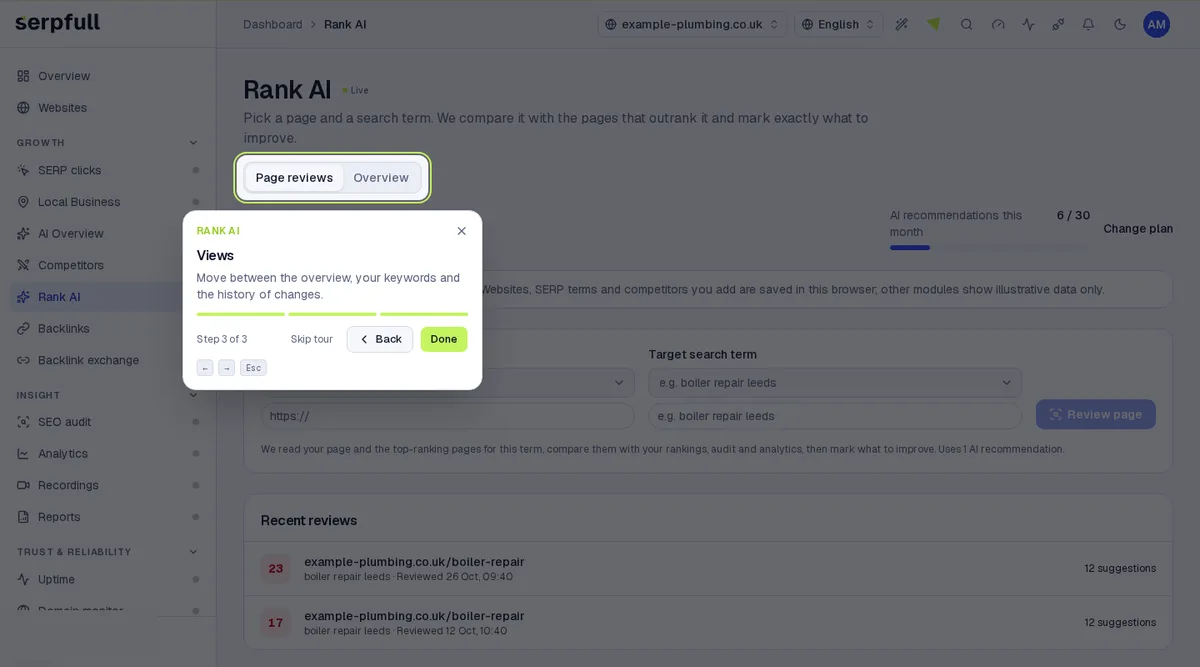
- Open Rank AI → Page reviews, pick one of your pages and a target search term (both are suggested from SERP clicks and SEO Audit), then press Review page.
- We read your page publicly with our normal crawler, respecting robots.txt, and read up to 5 top-ranking pages from the search results your runs have already recorded for that term. If none are recorded yet, track the term and run a check first.
- From each page we extract the title, meta description, headings, word count, topics, FAQs, structured data, internal links, images and readability, then compare them with your positions, SEO audit issues, AI Overview citations, analytics and local results.
- You see a safe copy of your page with scripts removed. A lime arrow marks each element that could be improved; hover, tap or tab to it to see the change, why, the evidence, the priority and a rewrite you can copy.
- Mark each suggestion accepted, dismissed or done. The side panel lists missing topics, competitor headings you don’t have and a gap table against each competitor.
- Every suggestion must quote text that is really on your page and cite real competitor or website data; anything that can’t be checked is dropped. Reviews are kept per page, so you can run a review again and compare the score.
Data it uses
- Positions: daily best positions from SERP clicks, Local Business and AI Overview runs over the last 35 days.
- SEO audit: each tracked page’s latest score, previous score and open issues.
- Uptime: incidents in the last 30 days.
- AI Overview: how often your site was shown and cited in the AI Overview.
- Analytics: organic visitors and page views, this week against last.
- Backlinks: referring domains lost in the last 30 days.
- If a source has no data, it’s left out of the score and marked as not connected under Data used.
Ranking health score
A score from 0 to 100, weighted across positions (35), 28-day trend (15), SEO audits (20), uptime (10), AI Overview (7.5), local results (7.5) and search traffic (5). Only sources with data are counted, and the weights are shared out between them. With uptime data alone there’s no score.
Keyword trends and opportunities
For every tracked term, Now is the average found position over the last 7 days and 28 days ago is the average from 28 to 21 days ago. Days the site wasn’t found are left out of the average and shown as the found rate. Opportunity keywords are terms in positions 4 to 20, marked as close to the top three, rising, or on page two. Open a keyword to see its daily positions and the recommendations about it.
Recommendations
- Position drops and terms no longer found, with any SEO score drop on the ranking page and any uptime incident from 3 days before to 1 day after the drop.
- SEO issues on tracked pages, critical first, and pages whose SEO score fell by 5 or more.
- Uptime incidents not tied to a drop.
- Terms where you’re cited in under half of AI Overview checks, and local terms where your listing is found in under 60% of checks.
- Organic visitors down 20% or more week on week, and pages with 30% fewer views.
- Lost referring domains with authority of 20 or more.
- Every recommendation shows its evidence and links to the page where you fix it. Recommendations are worked out by fixed rules, not by AI.
Weekly summary
Each website gets a new report every week, and owners, admins and members can press Refresh analysis (at most once every 10 minutes). When the plan allows, AI writes a short summary from the report’s numbers. A summary is only kept if every number in it appears in your data; otherwise you get a summary built from the data instead. Reports are listed under Report history.
Limits
- AI recommendations per website per month: Starter 10, Growth 30, Scale 60, Pro 150, Enterprise 300. Each page review and each weekly AI summary uses one.
- Each plan also has a monthly AI allowance per website. When recommendations or the allowance are used up, reports still run with a summary built from the data and page reviews pause until next month.
- Rank AI is included on every plan.
Elsewhere
AI connector tools: rank_ai_overview, rank_ai_recommendations, rank_ai_reports, rank_ai_generate_report, rank_ai_reviews, rank_ai_review, rank_ai_create_review and rank_ai_update_suggestion. Webhooks: rank_ai.summary_ready, sent when a report finishes, and rank_ai.review_ready, sent when a page review finishes, with the page, term, content score and suggestion count.
Take the guided tour
In the dashboard, click the wand icon in the header and choose “Rank AI”, or pick “Tour this page” while you’re on it. The tour highlights each part of the page step by step.
Opdateret