Backlinks from our own monthly link graph.
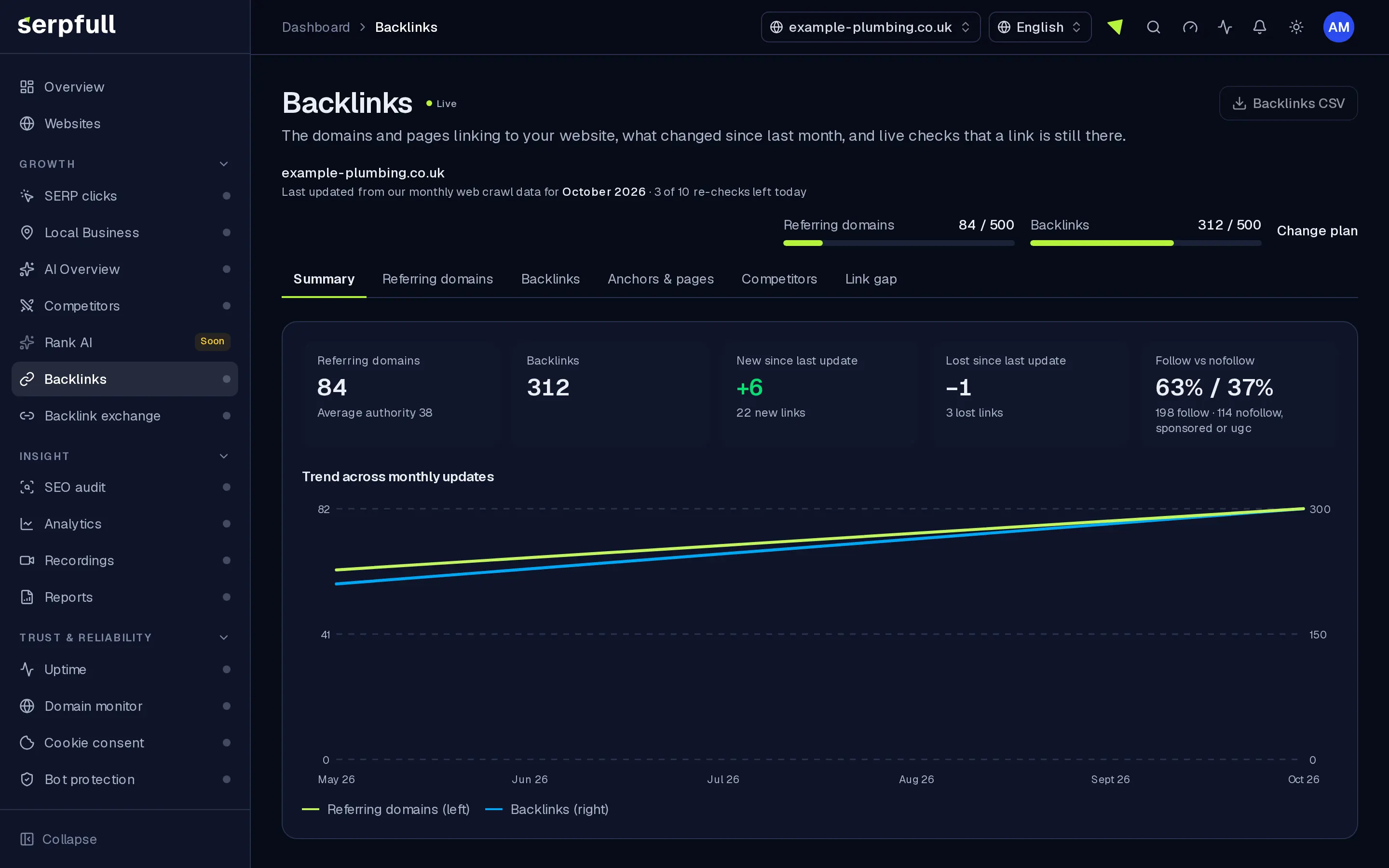
See the domains linking to you with an authority score, every link with its anchor and rel, and what is new or lost since the last update. Re-check any link live when you need to know it’s still there.
Gratis backlinkchecker
Controleer de backlinks van elke site
Voer een domein of pagina in om te zien wie ernaar linkt, rechtstreeks vanuit onze eigen linkgrafiek. Geen account nodig.
Kort gezegd
Backlinks is built on our own monthly web crawl, not a one-off lookup. Referring domains get an authority score from 0 to 100 from the link graph; each link shows anchor text, target page and follow, nofollow, sponsored or ugc. New and lost backlinks are flagged after every update, with trends, CSV export, report sections and live re-checks.
Why Backlinks
How it works
From setup to results, step by step
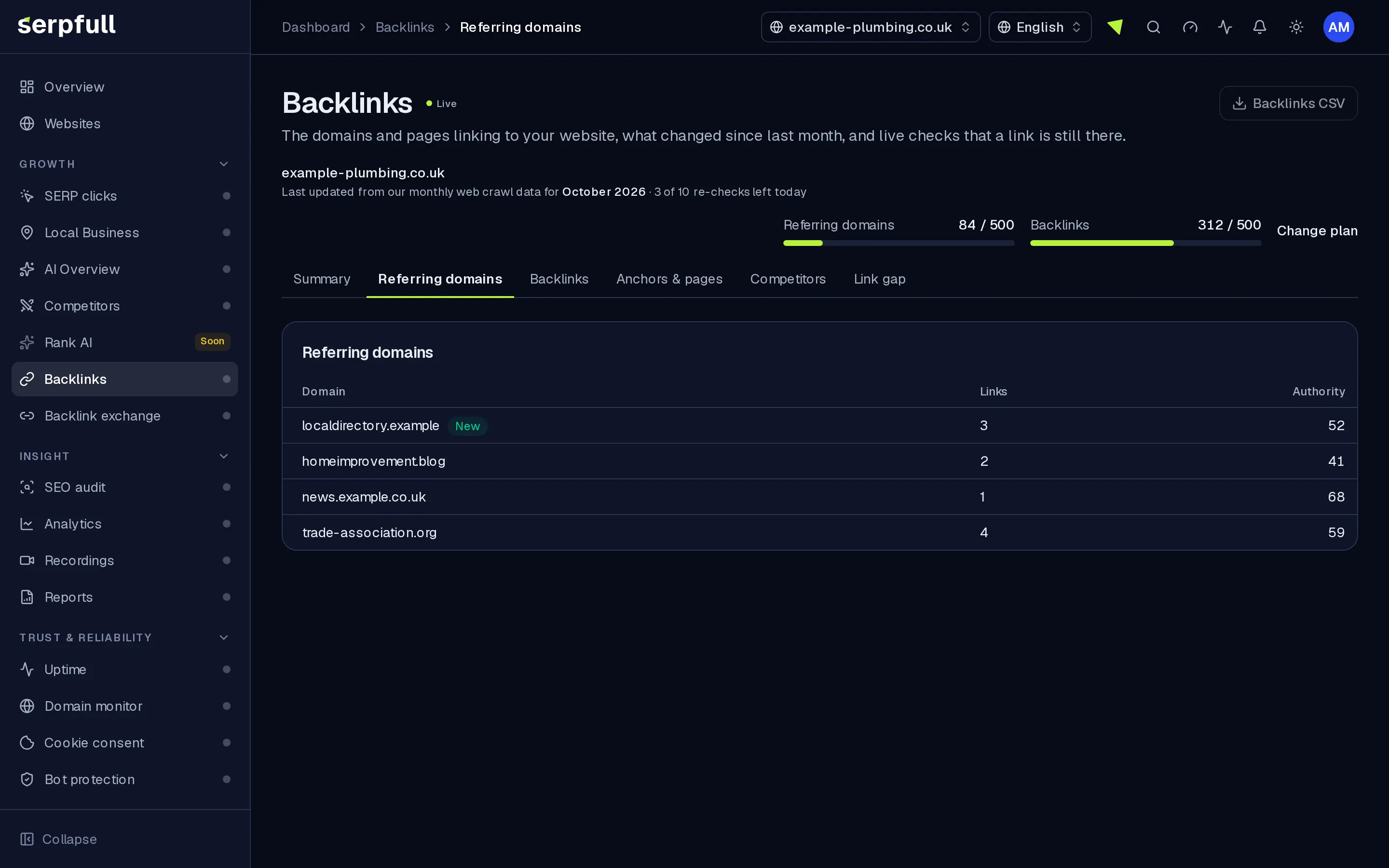
Screens from our demo workspace, showing sample data.
- 01
Add your website
Backlinks reads our link graph for your domain. There’s nothing to install.
- 02
See referring domains and links
Every domain linking to you with its authority score, and every link with page, target, anchor and rel.
- 03
Get told what changed
After each monthly update you see new and lost referring domains, with a notification and a trend chart.
- 04
Re-check and report
Re-check a link live, export any filtered table to CSV and add a Backlinks section to client reports.
Features
Inside Backlinks
Our own monthly crawl
Referring domains and links come from our index, refreshed each month, so you see the graph as we crawl it.
New and lost, every month
After each update you get new and lost referring domains, notifications and a trend chart, so lost backlinks don’t slip past.
Live re-checks
Re-check a link on demand; we also re-check the oldest links automatically and update anchor or rel if the page changed.
Referring domains
Every domain linking to you, with authority from 0 to 100 based on link-graph centrality, link count and the date we saw it.
Every link in detail
Linking page, target, anchor and rel. Search, filter by new or lost, anchor or target, sort and paginate.
Anchors and top pages
See which anchor texts point at you and which of your pages attract the most linking domains. SEO audit pages show the backlinks to each tracked page.
Reports and export
Add a Backlinks section to client reports and export any filtered table to CSV on plans that include export.
Geleide rondleidingen
Een rondleiding laat je Backlinks zien
Klik in het dashboard op het toverstaf-icoon in de header en kies de Backlinks rondleiding, of kies “Deze pagina rondleiden”. Het markeert elk deel van de pagina en legt stap voor stap uit wat het doet.
Hoe rondleidingen werkenUse cases
Who uses Backlinks
Plan limits
Backlinks on each plan
Limits apply per website. Every plan includes Backlinks.
| Limit | Starter | Growth | Scale | Pro | Enterprise |
|---|---|---|---|---|---|
| Referring domains and links shown | 500 | 2.500 | 10.000 | 100.000 | 500.000 |
| Live re-checks per day | 10 | 50 | 200 | 2.000 | 10.000 |
| History (months) | 3 | 6 | 12 | 36 | 60 |
| CSV export | No | Yes | Yes | Yes | Yes |
Questions
Backlinks FAQ
Where does the data come from?
From our monthly web crawl. Referring domains come from the link graph built from the last three monthly crawls; individual links come from the pages of those domains in the latest crawl.
Why don’t I see every backlink?
No crawl covers the whole web. Sites that block crawlers, pages behind logins and very new pages may be missing, and for large linking sites we read a sample of their pages, starting with the home page and pages about partners, resources and links. Referring domains are more complete than individual links.
How is the authority score worked out?
It’s based on where the domain ranks for harmonic centrality in the web’s link graph (how close it is to every other site), scaled from 0 to 100. It’s ours, so don’t compare it directly with scores from other tools.
What does a re-check do?
We load the linking page live and look for your link. If it’s there we update its anchor and rel; if it’s gone we mark it lost. Each plan includes a number of re-checks per website per day, shown in the table on this page.
How often is data updated?
Once a month, after each crawl. Live re-checks let you confirm individual links in between.
How much history is kept?
Trends and lost links are kept for a number of months that depends on your plan, as shown in the table on this page.
Know who links to you, and who stopped.
Add your website and see referring domains, every link and what changed since the last update.