See what to change on every page.
Pick a page and a search term. Rank AI compares it with the pages that outrank it and marks each thing to improve on a copy of your page, backed by competitor and ranking data.
Kort gezegd
Rank AI reviews a page for a target search term: it reads your page and the top-ranking pages your runs have recorded, compares titles, headings, topics, FAQs, structured data, links, media and readability, and adds your positions, SEO audit issues, AI Overview citations, analytics and local results. You get suggested edits marked on a copy of your page, each with the reason, the evidence and a rewrite to copy. An overview adds a 0–100 ranking health score, keyword trends, opportunity keywords and prioritised recommendations.
Why Rank AI
How it works
From setup to results, step by step
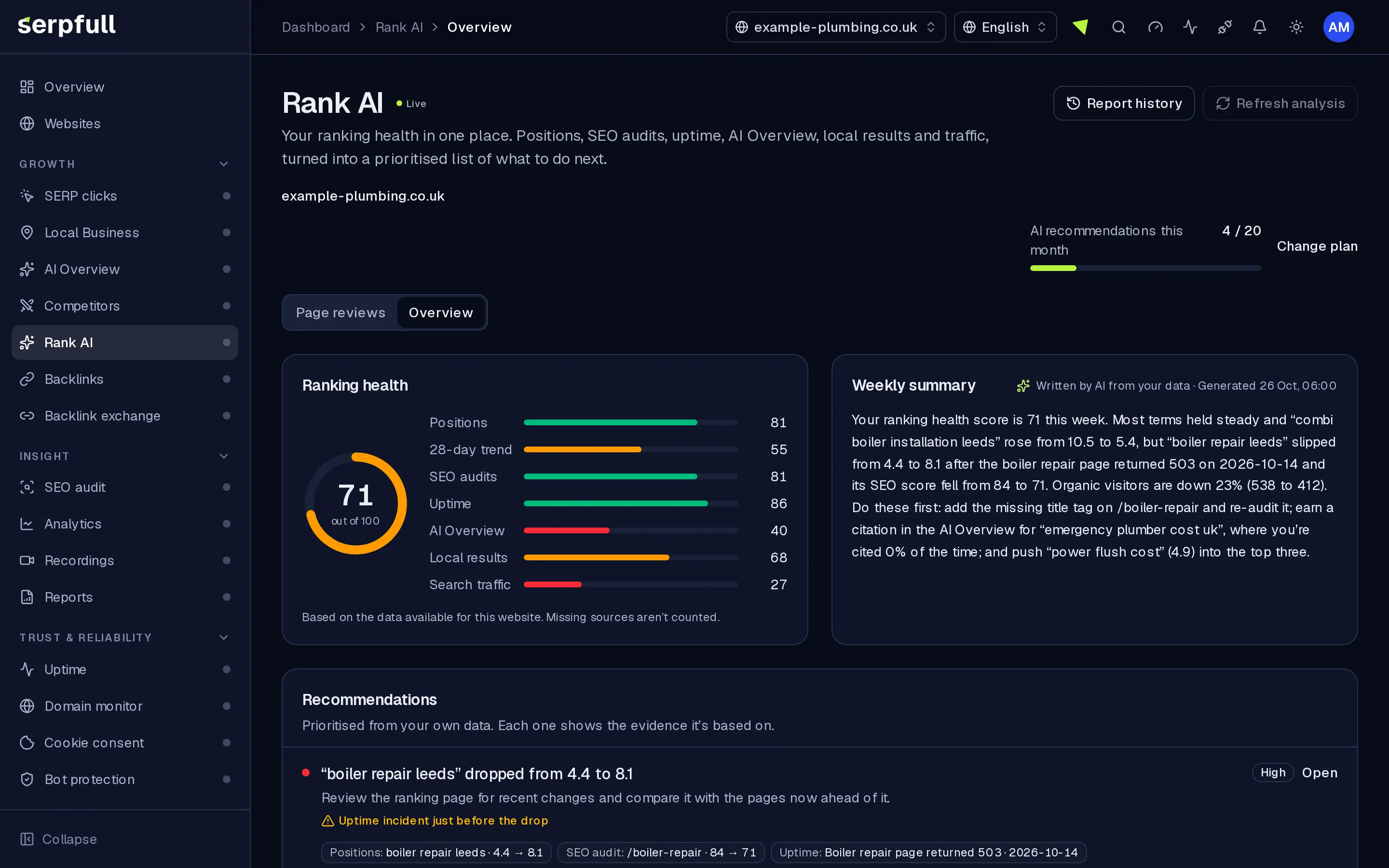
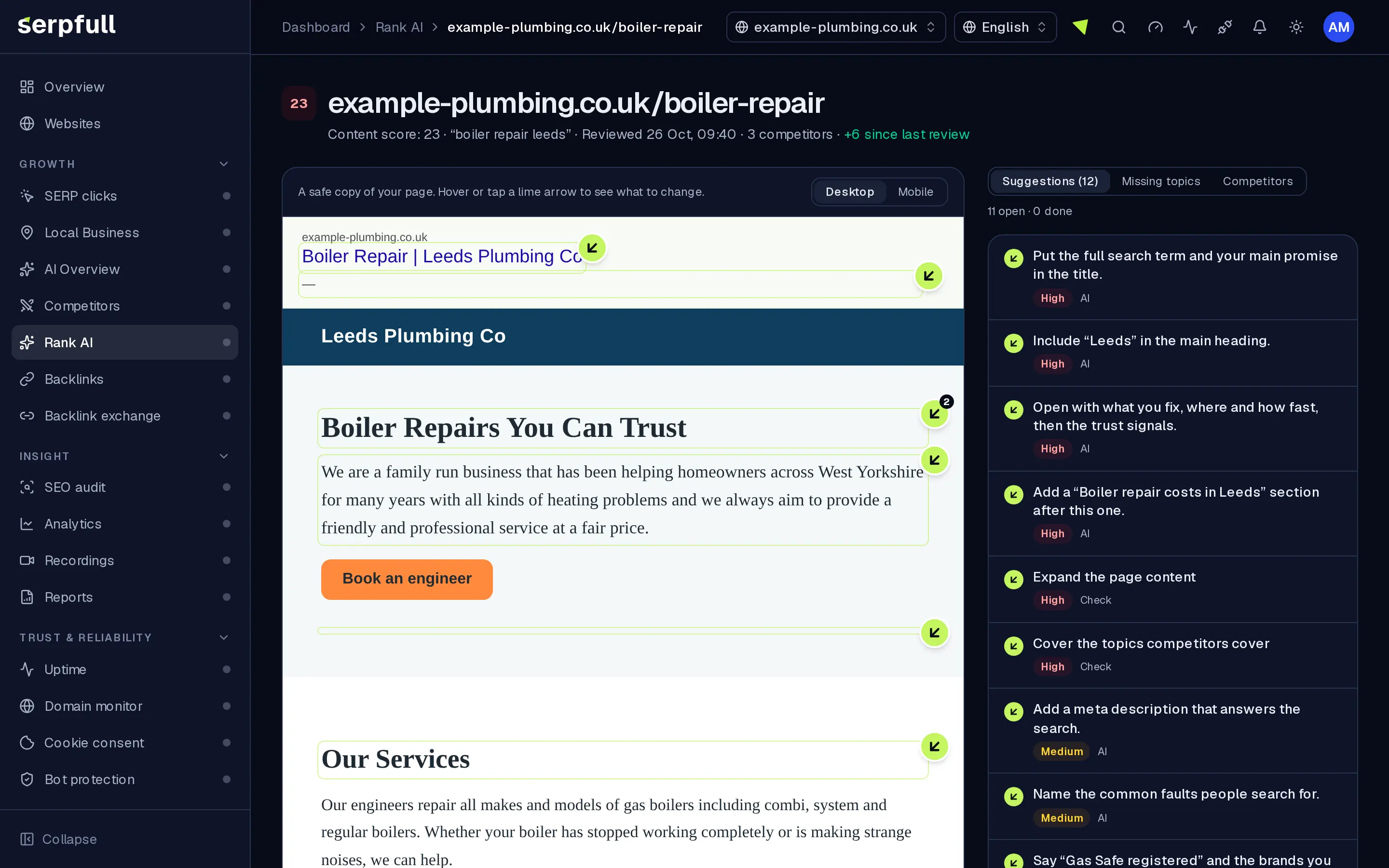
Screens from our demo workspace, showing sample data.
- 01
Pick a page and a term
Choose one of your pages and a target search term. Both are suggested from the terms and pages you already track.
- 02
We compare the top pages
Rank AI reads your page and the top-ranking pages for that term, publicly and respecting robots.txt, then lines them up with your own data.
- 03
See changes on your page
A lime arrow marks each element to improve. Open it to see the change, why, the evidence and a rewrite you can copy.
- 04
Track progress
Accept, dismiss or tick off each suggestion, then review the page again later and compare the score.
Features
Inside Rank AI
Reviews on your real page
A safe copy of your page with a marker on each heading, paragraph or image that could be better. Hover, tap or tab to it to see the suggestion.
Edits tied to your text
Each suggestion quotes the exact passage it’s about and gives a rewrite with a copy button, plus its priority.
Competitor gap table
Words, headings, FAQs, structured data, links, images and readability for your page next to each top-ranking page, with the topics and sections you’re missing.
Checked against real data
Suggestions must cite real competitor pages or your own positions, audits, AI Overview citations and traffic. Anything that can’t be checked is dropped.
Ranking health overview
A 0–100 score from positions, trends, SEO audits, uptime, AI Overview, local results and traffic, with prioritised fixes and opportunity keywords.
Review history
Every review is saved per page, so you can run it again after editing and see how the score moved.
Geleide rondleidingen
Een rondleiding laat je Rank AI zien
Klik in het dashboard op het toverstaf-icoon in de header en kies de Rank AI rondleiding, of kies “Deze pagina rondleiden”. Het markeert elk deel van de pagina en legt stap voor stap uit wat het doet.
Hoe rondleidingen werkenUse cases
Who uses Rank AI
Plan limits
Rank AI on each plan
Limits apply per website. Every plan includes Rank AI.
| Limit | Starter | Growth | Scale | Pro | Enterprise |
|---|---|---|---|---|---|
| AI recommendations per website per month | 10 | 30 | 60 | 150 | 300 |
Questions
Rank AI FAQ
Where does the data come from?
Your page and the top-ranking pages recorded by your own runs for that search term, plus your Serpfull modules for that website: SERP clicks, Local Business and AI Overview runs, SEO audits, Uptime, Analytics and Backlinks. If a source has no data yet, it’s left out.
Does the AI invent suggestions?
No. Every page review suggestion must quote text that is really on your page and cite real competitor or website data, and any that can’t be checked is dropped. Overview recommendations come from fixed rules, and a weekly summary with numbers not in your data is replaced with a plain one.
How often is it updated?
A report is created automatically every week. Owners, admins and members can also refresh it, up to once every 10 minutes, and the live score on the page updates as new runs and audits come in.
How many AI recommendations do I get?
Each plan includes a monthly number of AI recommendations per website, from 10 on Starter to 300 on Enterprise. Each page review and each weekly AI summary uses one. When they’re used up, the weekly report still runs with a plain summary and page reviews pause until next month.
Find out what to fix next
Rank AI is included on every plan. Add a website and it starts with the data you already track.