See where your business ranks in local map results, and who ranks around you.
Add a search term, your business name and your town. Each run searches in a real browser, reads the local map results, records your position and the businesses around you, then opens your listing and visits your website, from the same daily clicks as SERP clicks.

In short
Local Business runs real Google searches for the terms local customers use, reads the local map results (the top three and the full local list when shown), and records your position, how many businesses were listed and which rivals sat above and below you. When your business is listed, the run opens your listing and visits your website with the same browsing and dwell settings as SERP clicks. Runs come from your website's shared daily click pool, a term pauses after 3 runs where you aren't listed, and every run is plotted on a map at the real network location it came from.
Why Local Business
How it works
From setup to results, step by step
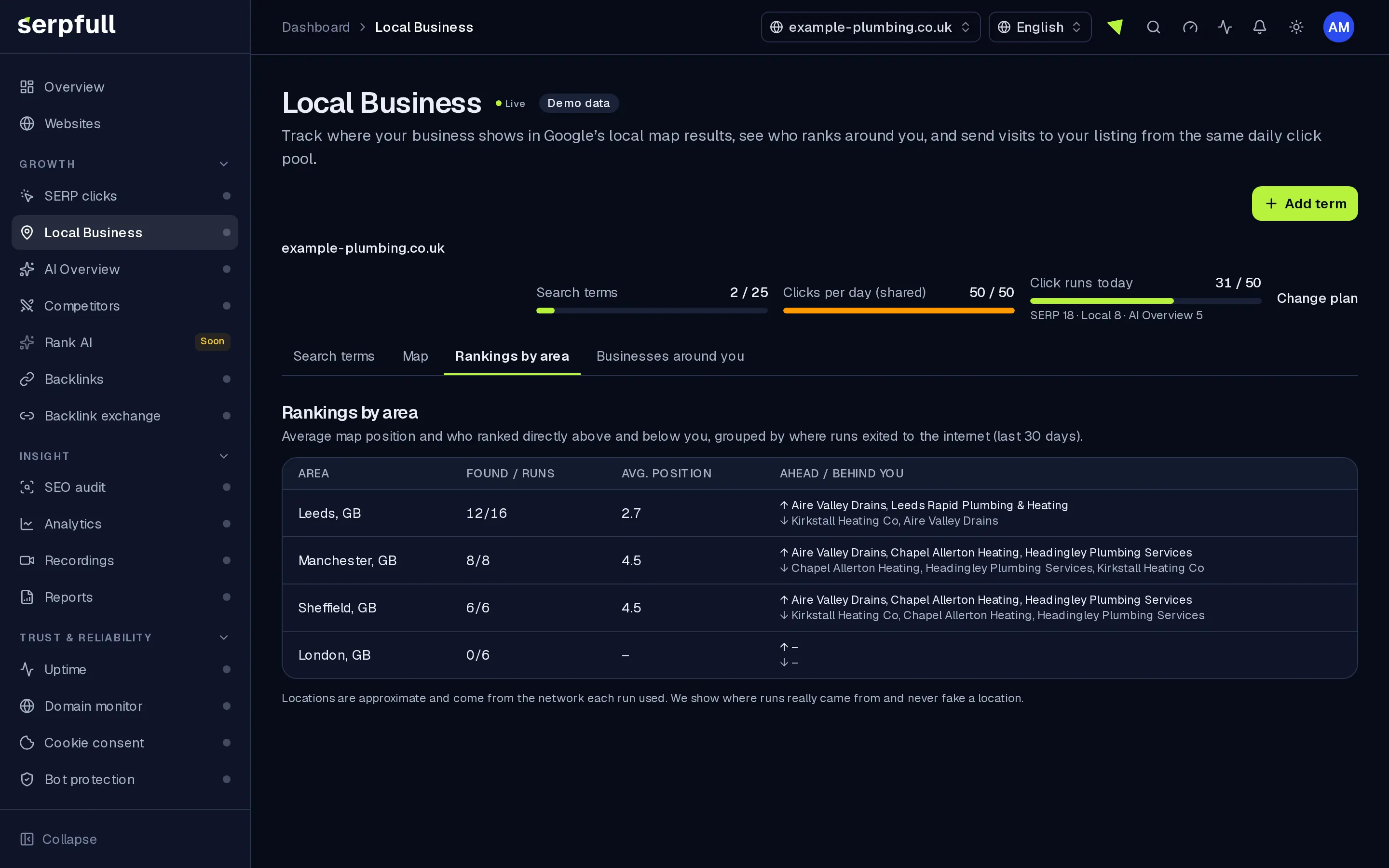
Screens from our demo workspace, showing sample data.
- 01
Add a local term
Enter the search term, your business name as it appears in local results and your town or postcode. We place a pin for your business, and you can drag it if it’s off.
- 02
We search and read the local results
A real browser searches, reads the top three map results and, when there’s a full local list, checks that too. We record your position and who is listed around you.
- 03
We open your listing and visit
When you’re listed, the run opens your listing and follows its website link, then browses your site with your dwell settings.
- 04
See it by area
Each run is a dot on the map at its real network location, coloured by your position. Areas show your average position and the businesses directly ahead and behind.
Features
Inside Local Business
Your position in local results
Position, total listings and whether the result came from the top three or the full local list, for every run.
Who’s ahead and behind
Rival business names with their positions, ratings and review counts when shown, so you can see who you need to pass.
Rankings by area
Runs are grouped into areas with an average position and the businesses most often directly above and below you.
Visits to your listing and site
When you’re listed, the run opens your listing and visits your website with the same browsing and dwell settings as SERP clicks.
One shared click pool
Local Business, AI Overview and SERP clicks share your website’s daily clicks, with a per-module breakdown in plan usage.
Searches from your market
Searches run through a network in the country, and optional US state or city, you set on the term, same as SERP clicks. The map plots each run where that session really connected from.
Not shown or not listed
When you aren’t found, the run says whether local results were shown at all, so you can tell a missing map pack from a missing listing.
Auto-pause and alerts
A term pauses after 3 runs in a row where you aren’t listed, and you’re notified if your website shows visitors a verification check.
Use cases
Who uses Local Business
Plan limits
Local Business on each plan
Limits apply per website. Every plan includes Local Business.
| Limit | Starter | Growth | Scale | Pro | Enterprise |
|---|---|---|---|---|---|
| Local terms | 10 | 25 | 75 | 250 | Custom |
| Clicks per day (shared pool) | 10 | 25 | 50 | 100 | 200 |
| Longest dwell time (seconds) | 60 | 60 | 120 | 180 | 240 |
| Pages per visit | 3 | 3 | 3 | 4 | 5 |
Questions
Local Business FAQ
What counts as a run?
Each finished run uses one click from your website’s daily pool, whether or not your business is listed, including runs that reach a verification check on your site. Blocked or timed-out runs are logged and don’t count.
Is the pool shared with SERP clicks?
Yes. SERP clicks, Local Business and AI Overview share one daily pool per website, with a per-module breakdown in plan usage. Local Business has its own limit on terms.
What if my business isn’t in the local results?
The run is logged as not found, with whether local results were shown at all. After 3 runs in a row where you aren’t listed, the term pauses and you get a notification.
Why do run locations differ from my town?
The town on the term is for matching your business in the results, not for choosing where the search runs from. Set the term’s country and optional US state or city to search from closer to your market; the map always shows where each session actually connected from.
Does my listing need a website link?
No. If your listing has no link to your site, the run opens the listing and stays there for your dwell time. With a link, it visits your site and browses like SERP clicks.
What do you record about rivals?
Their business names and positions, plus ratings and review counts when the results show them. Areas list the businesses most often directly ahead and behind you.
Is it included in my plan?
Yes. Local Business is included on every plan at no extra charge and uses the same daily clicks as SERP clicks.
Know where you stand on the map.
Add your business, your town and the searches your customers use, and see your position and rivals after each run.